
- Home
- Company
- Products
- Solutions
- Updates
- Literature
- Comparing
- Training & Demo
- Architecture & Technology
- System Data Flow
- LAMP Technology
- Language PHP
- Paperless Workflow
- Executive Desktop
- Executive Desktop Business Intelligence
- Key Indicators (KPI’s)
- Applications Dictionary
- Web Architecture
- Data Center and Product Security
- OpenPro built in Transaction Integrity
- Automated Migration, Conversion
- System Integration using REST and SOAP
- Databases that OpenPro ERP uses
- 3rd party add-ons
- ERP Phone Integration
- Fax and SMS Integration
- Create a Screen
- Ajax Technology
- Industries & Markets
- Small Business
- Medium Business
- Enterprise ERP
- Implementation
- Features
- Services
- Customer
- Distributor
- Investors
- Home
- Company
- Products
- Solutions
- Updates
- Literature
- Comparing
- Training & Demo
- Architecture & Technology
- System Data Flow
- LAMP Technology
- Language PHP
- Paperless Workflow
- Executive Desktop
- Executive Desktop Business Intelligence
- Key Indicators (KPI’s)
- Applications Dictionary
- Web Architecture
- Data Center and Product Security
- OpenPro built in Transaction Integrity
- Automated Migration, Conversion
- System Integration using REST and SOAP
- Databases that OpenPro ERP uses
- 3rd party add-ons
- ERP Phone Integration
- Fax and SMS Integration
- Create a Screen
- Ajax Technology
- Industries & Markets
- Small Business
- Medium Business
- Enterprise ERP
- Implementation
- Features
- Services
- Customer
- Distributor
- Investors
E.D.I. Overview
If you’re wondering what EDI stands for, it’s “Electronic Data Interchange”. Follow this link to learn more about EDI and its applications.
Want to learn what an EDI payment is? Follow the link for a comprehensive overview of EDI and how it can help improve business operations.
Electronic Data Interchange (EDI) can be established by the conventional ansi x25 method using a value added network.
OpenPro is designed with Electronic Data Interchange in mind. No more manually entering orders, you just press a button and hundreds of orders are processed in seconds.
OpenPro also has XML layouts for importing and exporting data to other systems. OpenPro ERP Software can interface to each trading partner and send OpenPro xml formatted data. OpenPro works with all the Value Added Networks (VAN) to bring you ease of integration.
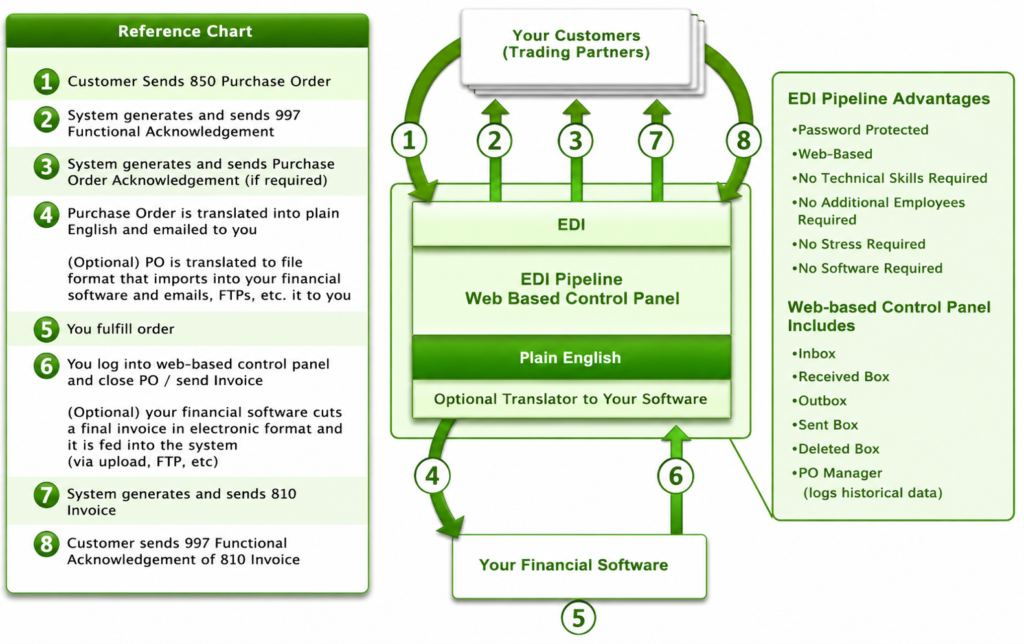
OpenPro EDI Solution – Simple and Affordable
Our EDI solution is a simple way for small and medium sized suppliers to process EDI transactions. Our EDI services are affordable and turn-key, which means you don’t have to know anything about EDI or how it works. All you need is Internet access and email.
Our web-based solution allows you to trade EDI documents and files and includes the ability to:
- Receive 850 Purchase Orders
- Receive 997 Functional Acknowledgement
- Send 810 Invoices
- Send 997 Functional Acknowledgement
- Send 856 Advanced Ship Notice (ASN)
- Send 855 Purchase Order Acknowledgement (PO)
- Send / Receive any other EDI documents required
Advantages of Our EDI Offering
The OpenPro EDI Pipeline can serve as a stand-alone solution to meet the trading partner requirements, or it can be a single interface to trade EDI documents with all of your customers. The following is a list of known trading partners that use EDI. Our system can streamline your EDI communications with any of these partners.
The advantages of using our system include:
- Plain English view of documents (purchase orders, invoices, etc)
- Web-based system allows you to access it from any computer
- No software installation required
- No additional staff required
- No technical skills required
- We handle all setup and technical interaction with your trading partners
- We train you on the web-based control panel
- We handle all of the technical stuff to set it up and keep it running
- We can provide electronic files that import into your software systems
- We speak English, and we answer the phone when you call us
- You can stop stressing about EDI and focus on growing your business
- You gain our technology and experienced support staff for a fraction of the price of one employee
Details of Our EDI Offering
The OpenPro EDI Pipeline solution for trading partners includes access to a web-based, password protected control panel that allows you to view and manage all aspects of document trading. The web-based Control Panel includes the following features:Communication Manager
The communication manager is an easy to understand interface that allows you to see every EDI file / document sent to and received from trading partners. The files can be viewed in a plain English printable format, or in the raw EDI format. The following components are included with the communication manager.
- Inbox – showing all pending inbound documents (i.e. 850 Purchase Orders and 997 Functional Acknowledgements).
- Received Log – a historical log of all inbound documents already processed.
- Outbox – showing all pending outbound documents (i.e. 810 Invoices, 856 Advance Ship Notices, 855 Purchase Order Acknowledgements, and 997 Functional Acknowledgments).
- Sent Log – a historical log of all outbound documents already processed.
- Deleted Log – A log of all pending documents that were deleted before being processed.
Order Log
The Order Log is an alternative way to view all documents related to a single inbound Purchase Order. When the 850 Purchase Order is received from trading partners, it is set up in the Order Log. In addition, all of the corresponding documents associated with the Purchase Order (i.e. the 810 Invoice, the 997 Functional Acknowledgements, etc) are tied to it for easy access.
How You Get Purchase Orders
Once the 850 Purchase Order is received by the EDI Pipeline system, it is converted into a plain English (readable) format that you can view and print. The plain English format is available in any of the following ways:
- Via Email – automatically sent to your email address(es)
- Via Your Control Panel – log in to view it at any time
- Via Fax – automatically sent to your fax number
In addition, the Purchase Order can be converted into an electronic file that can be imported into any industry standard or unique electronic format.
Import into Your Software Programs
The EDI Pipeline solution can optionally include a method to electronically import trading partner Purchase Orders into your financial / inventory software (or any other software system), eliminating the need to manually key in the order data. The Purchase Order is received by the EDI Pipeline system, translated into the specific format your software needs, and sent to your office to import. The file can be sent via any method desired, with the most popular being via email or FTP (to a specific server location).
What Are the Next Steps?
While you are investigating OpenPro…
- Call OpenPro today, we will discuss your EDI needs and provide specific pricing (no obligation to you.
- We show you a demo of how the EDI works with a complete ERP package.
If you decide to use our solution…
- We contact trading partners directly and work out all of the details.
- We set up your EDI system.
- You take orders and send invoices via EDI – hassle and worry free.